Audio Interface vs Mixer: Which Do You Actually Need?
By Marcus Bell · Published · Updated · 3 min read
If you're building a home studio, one of the first big decisions is choosing between an audio interface and a mixer. Both sit at the front of your signal chain, converting analog sound into digital data for your computer. But they serve different purposes and excel in different scenarios.
This article breaks down the practical differences—from preamp quality and latency to workflow and expandability—so you can decide which device fits your recording style and budget.
What Does an Audio Interface Do?
An audio interface is a dedicated box that connects microphones, instruments, and monitors to your computer. It typically includes one or more microphone preamps, line inputs, and outputs for speakers and headphones. The interface handles analog-to-digital and digital-to-analog conversion, and often provides phantom power for condenser mics.
Most modern interfaces connect via USB or Thunderbolt and are designed to work seamlessly with your DAW. They prioritize low-latency performance and clean, transparent conversion. If you mainly record one or two sources at a time and mix in the box, an interface is usually the simplest and most cost-effective choice.
For a deeper dive into the basics, see our guide on what an audio interface actually does.
- Dedicated mic preamps with phantom power
- Low-latency drivers for real-time monitoring
- Compact and often bus-powered
- Direct integration with DAW software
What Does a Mixer Bring to the Table?
A mixer, on the other hand, is designed to combine multiple audio sources, adjust levels, and route signals. Analog mixers offer hands-on control with faders and EQ knobs, while digital mixers add processing, effects, and sometimes multi-track recording to USB drives or DAWs.
Mixers excel in live sound and band recording situations where you need to balance many inputs at once. They can also be useful in the studio if you want to sum multiple synths or drum machines without repatching. However, not all mixers include a built-in audio interface—those that do are often called 'hybrid' mixers.
If you're recording a full band live, a mixer with direct outs or a built-in interface can be a practical hub. But for typical home studio work, a mixer may add unnecessary complexity.
- Multiple inputs for simultaneous sources
- Hands-on control over levels and EQ
- Built-in effects on many digital models
- Can work standalone without a computer
Preamp Quality and Conversion
In the budget realm, preamp quality can vary widely. Many affordable interfaces (under $200) offer clean, transparent preamps with enough gain for most dynamic and condenser mics. Mixers in the same price range often prioritize features over preamp finesse, and their conversion may be limited to a stereo output.
That said, higher-end mixers can have excellent preamps and converters. But if you're comparing a $150 interface to a $150 mixer, the interface will typically win on preamp quality and conversion transparency. For critical recording, a dedicated interface is usually the safer bet.
Check our 7-point checklist to evaluate preamp quality and other key specs before buying.
| Feature | Audio Interface | Mixer | Typical Range |
|---|---|---|---|
| Inputs | 1–8 mic/line, expandable via ADAT | 4–32 channels, not always multi-track USB | Interfaces: 2–8; Mixers: 8–16 |
| Preamp quality | Clean, transparent, often better per dollar | Variable; budget mixers may be noisier | $100–$200: interface wins |
| Latency | Low with dedicated drivers and direct monitoring | Can be higher unless direct monitoring is built in | <10 ms typical for interfaces |
| Workflow | DAW-centric, each input on separate channel | Hands-on faders, may require workarounds for multi-track | Interfaces: simpler for studio |
| Expandability | Add preamps via ADAT, S/PDIF | Limited to built-in channels | Interfaces: up to 8+ via ADAT |
| Best for | Home studio, solo recordings, mixing in the box | Live sound, band rehearsals, hands-on mixing | Depends on use case |
Latency and Monitoring
Latency is the delay between playing a note and hearing it back. Audio interfaces are built with low-latency drivers and often include direct monitoring, which lets you hear your input before it goes through the computer. This is crucial for recording vocals or guitars without distracting delay.
Mixers with USB audio often route monitoring through the computer, which can introduce latency unless they offer direct monitoring. Some digital mixers have onboard monitoring with very low latency, but it's not guaranteed. If latency is a concern, an interface with direct monitoring is the more reliable choice.
For a comparison of connection types, read USB vs Thunderbolt audio interfaces.
Workflow and Expandability
An interface integrates tightly with your DAW: you select it as your audio device, and all inputs appear as separate channels. This streamlined workflow is ideal for mixing in the box. Expanding an interface usually means adding a preamp via ADAT or S/PDIF, which is common on mid-range models.
A mixer offers a more tactile workflow, with faders and knobs for each channel. This can speed up live tweaking or band rehearsals. However, getting all channels into your DAW may require a mixer with multi-track USB output, which is less common in budget models.
If you need many inputs and prefer hands-on control, a digital mixer with USB audio could work. But for most home producers, an interface with enough I/O is simpler and more flexible.
- Interfaces: direct DAW integration, easy expansion via digital inputs
- Mixers: tactile control, but multi-track recording may be limited
- Hybrid mixers combine both but can be complex
- Consider future needs: will you record drums or a full band?
When to Choose Which
Choose an audio interface if you mainly record vocals, instruments, or small ensembles one or two sources at a time, and you mix in the box. Interfaces offer better preamp quality per dollar, lower latency, and simpler integration with your DAW.
Choose a mixer if you need to handle many sources live, want hands-on control, or need to mix without a computer. For band recording, a digital mixer with multi-track USB output can be a powerful all-in-one solution.
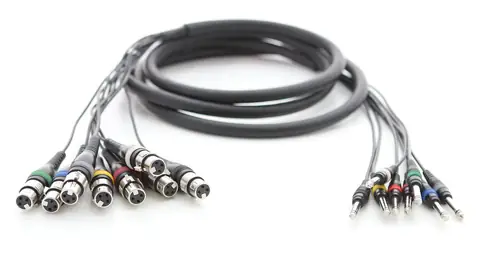
Budget matters: under $200, interfaces like those in our comparison guide deliver solid recording quality. Mixers in that range often compromise on preamps or conversion. Also, don't forget cables—our home studio cable guide explains what you'll need.
- For most home studios, an audio interface offers better preamp quality, lower latency, and simpler DAW integration.
- Choose a mixer if you need many inputs for live use or prefer hands-on control; ensure it has multi-track USB for recording.
- Under $200, interfaces generally outperform mixers in recording quality.
- Consider your future needs: expanding an interface via ADAT is easier than adding channels to a mixer.
Marcus has spent years writing about home studio gear, DAWs and the practical side of recording on a budget. He focuses on clear comparisons and checklists that help beginners avoid expensive mistakes. He also covers the web tools and sites that support independent musicians.