Choosing a DAW: Workflow, Budget and Real Differences
By Marcus Bell · Published · 4 min read

Every recording project runs on a digital audio workstation, and the choice shapes everything from how fast you capture an idea to how many plug-ins you can run before the CPU complains. The good news: modern DAWs all record clean audio and support the same third-party plug-in formats, so the decision comes down to workflow, not raw sound quality.
That said, the differences are real. Editing models, bundled instruments, track limits on entry tiers and upgrade pricing vary widely, and switching later costs time. This guide breaks down the leading options and the questions worth answering before you pay.
What a DAW Actually Does for You
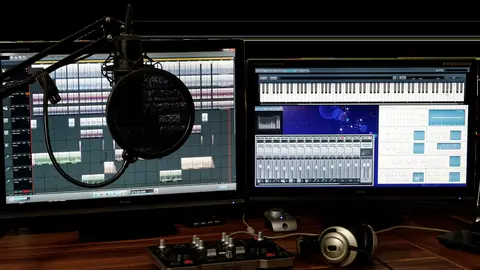
A DAW is the software layer between your interface and your finished track. It records incoming audio, hosts virtual instruments and effects, arranges regions on a timeline, mixes through a routing matrix and exports a stereo master. If you are still working out where the interface fits, start with what an audio interface actually does before comparing software.
The practical differences between DAWs show up in three places: how you edit audio, how you handle MIDI and how the mixer and routing are laid out. A songwriter who loops and stacks ideas has different needs from an engineer mixing 40-track band sessions. Neither is better; they reward different software.
- Recording, editing, arranging and mixing in one application
- Hosts VST, AU or AAX plug-ins depending on platform
- Bundled instruments and effects vary hugely by tier
- Track count and export options are the usual entry-level limits
The Main Contenders and Their Strengths
Ableton Live remains the standard for electronic production and live performance, with a session view built for loops and clip launching and a warping engine that handles tempo changes well. Logic Pro offers an enormous bundle of instruments and effects for a one-time price on macOS, making it strong value for composers and band recording. Pro Tools still dominates studio interchange and is the safest bet if you plan to move sessions between rooms.
FL Studio's pattern-based sequencing suits beatmakers, and its lifetime free-update model is unusual. Cubase and Studio One both offer strong comping and mixing tools, with Studio One's drag-and-drop workflow appealing to people coming from other software. Reaper is cheap, light and endlessly configurable, though you assemble more of your own toolkit.
Match the Software to Your Workflow
If you write by playing an instrument and layering takes, prioritise comping, take lanes and a linear timeline. If you build tracks from loops and samples, prioritise clip launching, warping and fast browsing. If you mix for others, prioritise routing flexibility, metering and session compatibility with the studios you work with.
Try before committing: most of these offer full-function demos for 30 days or more. Spend that time recreating a finished song rather than clicking through presets. The software that slows you down least after a week of real work is the right one, regardless of what a feature chart says.
Budget: What Each Tier Really Costs
Entry tiers usually sit between $60 and $250 and typically cap tracks, omit advanced metering or limit bundled content. Mid tiers run roughly $200 to $400, and flagship versions land around $400 to $700, with Pro Tools and Cubase on subscription or upgrade paths that add cost over time. Logic Pro is the outlier at a one-time price with no track limits.
Factor in the rest of the chain. If your interface budget is tight, read budget interfaces under $200 so software does not eat the money you need for conversion and preamps. Also check whether your CPU and interface connection leave headroom; USB versus Thunderbolt matters more once you run large sessions.
Computer, Plug-ins and Session Size
DAW performance is mostly a CPU and buffer story. Large sample-based instrument libraries want fast storage and plenty of RAM, while heavy plug-in chains on many tracks stress the CPU. Most modern machines handle 30 to 60 audio tracks with moderate processing comfortably; dense virtual-instrument sessions are where systems struggle.
Plug-in compatibility is the other constraint. VST covers most Windows and macOS software, AU is macOS-only, and AAX is required for Pro Tools. Check that your must-have instruments exist in your chosen format before you buy. Also confirm the DAW supports your interface's driver mode at low buffer sizes without clicks.
Upgrades, Licences and Long-Term Cost
Ownership models differ more than feature lists. Some charge a one-time price with paid major upgrades every few years; others use annual subscriptions or update plans. Over five years, a $200 perpetual licence with two $100 upgrades costs less than a $100-per-year subscription, but subscriptions spread cost and always include the latest version.
Consider how long you will keep the software and whether your collaborators use the same version. Project files are rarely backward compatible, so a studio running an older release can block sessions. For a home setup, the safer pattern is a stable version plus a documented upgrade window, rather than chasing every release.
Building the Rest of the Chain
Software is one link. Room treatment and monitor placement change what you hear far more than a DAW upgrade, so read monitor placement in a small room before spending on plug-ins. Input count matters too: most project studios work well with two to eight preamps, explained in how many preamps you need.
Finally, plan the interface purchase around your DAW's requirements and your computer's ports. A short checklist keeps the decision grounded: choosing your first audio interface walks through the seven points that matter most, from driver stability to input count.
| DAW | Platforms | Typical price range (USD) | Best for |
|---|---|---|---|
| Ableton Live | Windows, macOS | 100–750 | Electronic production, live performance |
| Logic Pro | macOS only | One-time ~200 | Composers, band recording, large bundles |
| Pro Tools | Windows, macOS | Subscription or perpetual, ~100–600/yr or buy | Studio interchange, mixing for clients |
| FL Studio | Windows, macOS | 100–500, lifetime updates | Beatmaking, pattern-based sequencing |
| Cubase | Windows, macOS | 100–600 | Composition, scoring, detailed MIDI editing |
| Studio One | Windows, macOS | 100–500 | Drag-and-drop workflow, mixing |
| Reaper | Windows, macOS, Linux | ~60 discounted licence | Budget setups, customisation, light CPU use |
- Choose by workflow first: linear recording, loop-based writing or client mixing all reward different DAWs
- Entry tiers cap tracks and bundles; budget $60–$250 for a first licence and check upgrade costs
- Confirm plug-in format support (VST, AU, AAX) before buying any DAW
- A stable version and treated room beat constant upgrades and new plug-ins
Marcus has spent years writing about home studio gear, DAWs and the practical side of recording on a budget. He focuses on clear comparisons and checklists that help beginners avoid expensive mistakes. He also covers the web tools and sites that support independent musicians.